Header Tags and Heading Hierarchy
Last updated
Heading tags, which SEOs usually call header tags, are the HTML elements H1 to H6 that label a page’s sections. They are not the <header> element, which marks a page or section banner. Heading hierarchy is how the six levels nest to form the page’s structural skeleton. Used well, it tells readers, screen readers and the browser tools that build a table of contents from headings how the page’s sections relate,1 and tells Google what each section is about. The tags themselves matter less to Google than most SEO advice suggests, and the sections below say exactly how much.
What are the basic heading hierarchy rules?
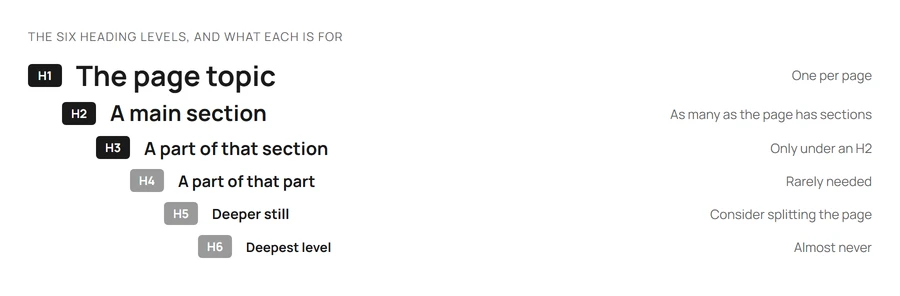
Use one clear H1. The H1 is the page’s primary heading. It should reflect the page topic, match the search intent the page targets, and align (without necessarily duplicating) the title tag. Multiple H1s are valid HTML, but a single H1 keeps the page’s primary topic unambiguous.
H2s define major sections. Each H2 introduces a distinct section of the page. They should make sense read in sequence as a table of contents.
H3s nest under H2s. When a section needs subdivision, H3s break it down. Don’t skip levels (jumping from H1 directly to H3), for the accessibility reason covered below rather than a ranking one, and don’t use H3s as styling for visually emphasised text.
Lower levels exist when needed. H4 to H6 are valid HTML elements. In practice, most pages don’t need them. If you’re nesting beyond H3, the section is probably better split into multiple pages.
Why does heading hierarchy matter?
For Google: what a heading says. This is the part Google confirms it reads. John Mueller, in a 2020 Webmaster hangout: “headings on a page help us to better understand the content on the page. Headings on the page are not the only ranking factor that we have. We look at the content on its own as well.” And later in the same answer: “a heading is a really strong signal telling us this part of the page is about this topic.”2 It does not need to be in a heading tag to count. When Google builds a title link it reads “the main visual title or headline shown on a page, content that site owners often place within <H1> tags or other header tags, and content that’s large and prominent through the use of style treatments”,3 and it may use that text in place of a <title> that is missing, half-empty or does not match the page.4
For Google: which level, and in what order. This is the part it says it does not read. Mueller, same answer: “whether you put that into an H1 tag or an H2 tag or H5 or whatever, that doesn’t matter so much.”2 The SEO Starter Guide files “number and order of headings” under “Things we believe you shouldn’t focus on”: “Having your headings in semantic order is fantastic for screen readers, but from Google Search perspective, it doesn’t matter if you’re using them out of order. The web in general is not valid HTML, so Google Search can rarely depend on semantic meanings hidden in the HTML specification.”5 Gary Illyes on the Search Off the Record podcast: “I know that some people like to think that HTML structure matters all so much for rankings, but in fact, it doesn’t matter that much.”6 Mueller still calls a hierarchical structure “an awesome idea & a great practice” that is “not just useful to Google, it’s also important for accessibility”,7 which is a recommendation, not a ranking claim.
For AI systems. Google’s guidance for its AI features is the same as for Search: “When it comes to semantic HTML, focus on human readability and don’t worry about perfect code”, and “chunking” is listed among the things not to do, because “there’s no requirement to break your content into tiny pieces for AI to better understand it”.8 What is documented is one step earlier than ranking. AI agents and fetch tools commonly convert a page from HTML to Markdown before a model reads it, and Cloudflare’s Markdown for Agents documentation gives the example: <h2 class="section-title" id="about">About Us</h2> becomes ## About Us.9 A converter reads the tag, so a real <h2> arrives as a heading and a paragraph styled to look like one arrives as a paragraph. That is a reason to use real heading tags; it is not evidence that any model weighs them. Neither Google, Microsoft nor OpenAI documents reading heading tags at retrieval time. Write headings for the reader and treat any AI benefit as unconfirmed.
For accessibility. This is where headings measurably matter. In WebAIM’s 2024 survey of 1,539 screen reader users, 71.6% said their first method for finding information on a long page is to navigate through its headings, ahead of the browser’s Find feature at 13.6%.10 A page with broken or skipped headings is harder to navigate for most of that audience.
For readers. Most users scan before they read: Nielsen Norman Group’s original web-reading study found 79% of test users always scanned a new page and only 16% read word by word, and recommended “meaningful sub-headings (not ‘clever’ ones)” as a direct response.11 This is also the only positive instruction Google gives about headings: “Break up long content into paragraphs and sections, and provide headings to help users navigate your pages.”5 Clear, descriptive headings let scanners decide whether to engage with a section.
Heading patterns that work
Question-shaped H2s for informational content. Headings like “What is X?”, “How does X work?”, and “When should you use X?” map onto how people search, and tell a scanning reader exactly what the section answers. Use this pattern for pages targeting informational intent.
Statement-shaped H2s for opinion or analysis content. “Why X is overrated”, “The case for Y”, and “The limits of Z” work better for analytical pieces. Forcing every heading into a question form is unnatural.
Parallel structure within a section. When an H2 introduces a comparison (for example, three approaches to a problem), the H3s introducing each approach should be parallel: same grammatical form, same level of specificity. Mixing forms makes the structure harder to scan.
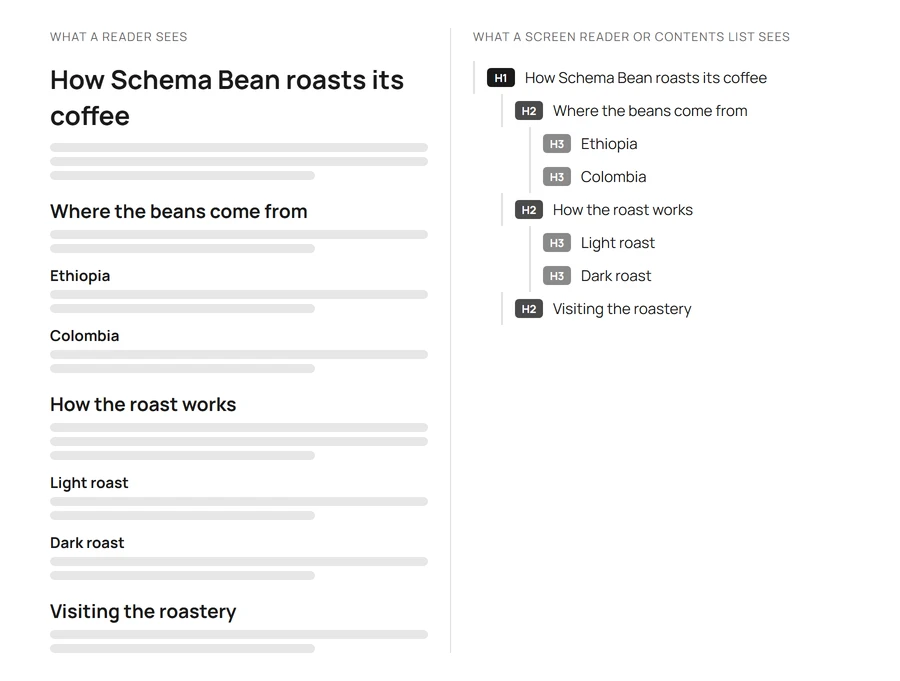
Headings as a table of contents. Read the headings in order, ignoring everything else. They should form a coherent outline of the page. If they don’t, the structure needs work.
Heading patterns to avoid
- Relying on multiple H1s to carry structure. HTML5 permits multiple H1s, and John Mueller has said “you can use H1 tags as often as you want on a page. There’s no limit, neither upper or lower bound. Your site is going to rank perfectly fine with no H1 tags or with five H1 tags”, adding that “with HTML5 having multiple H1 elements on a page is completely normal and kind of expected”.12 So multiple H1s are not a ranking problem. A single, clear H1 is still the better convention: it keeps the page’s primary topic unambiguous for readers and screen-reader users. Use one H1, then H2s for sections.
- Skipping levels. H1 directly to H3, or H2 directly to H4, breaks the sequence screen readers navigate by. Google says out-of-order headings do not matter to Search,5 so this is an accessibility rule rather than a ranking one.
- Using headings for styling. H2s aren’t a font-size choice. If you want emphasised non-heading text, use
<strong>or CSS classes. - Generic headings. “Introduction”, “Conclusion”, “More information”, and “Other things to consider” are wasted opportunities. Headings should describe the section’s content.
- Keyword-stuffed headings. Repetitive keywords across H2s look manipulative and read poorly. One natural use of the target keyword in headings is enough.
H1 vs title tag
The H1 and title tag don’t need to be identical, but they should be consistent. The title tag is the SERP-facing label optimised for click-through; the H1 is the on-page headline optimised for the reader who has already arrived.
Common patterns:
- Identical. Acceptable. Often the simplest option.
- Title tag = H1 + brand suffix. Common and effective. Title tag adds ” | Site Name” for SERP recognition; H1 omits it.
- Title tag and H1 substantively different. Use sparingly. Significant divergence is worth checking: it often means the page is trying to target different intents in different places, and Google lists “no clear main title” among its triggers for rewriting the title link.4
H1s vs page titles
Ask an SEO what a page's title is and they'll point to the <title> element. Ask a designer or content editor and they'll point to the H1. Both are correct within their context, which is why "page title" causes more confusion than it resolves. Use "title tag" or "meta title" for the <head> element, and "H1" for the visible heading.
Frequently asked questions
Does the order of H2s matter for SEO?
Not for rankings. Google’s SEO Starter Guide says headings in semantic order are “fantastic for screen readers, but from Google Search perspective, it doesn’t matter if you’re using them out of order”.5 Order them for the reader: the sequence should match the logical flow someone expects, and the headings read in isolation should form a coherent outline of the page.
My SEO tool flags a missing H1 or multiple H1s. Should I fix it?
Not for Google’s sake, and Google has said so twice. John Mueller in 2019: “Some SEO tools flag this as an issue and say like oh you don’t have any H1 tag or you have two H1 tags… from our point of view that’s not a critical issue. From a usability point of view maybe it makes sense to improve that.”12 Gary Illyes in 2024, asked whether the Starter Guide’s “doesn’t matter” line was out of date because a tool said otherwise: the guide had just been refreshed, and “just because a non-Google tool tells you something is good or bad, that doesn’t make it relevant for Google; it may still be a good idea, just not necessarily relevant to Google.”13 Fix it if the page is genuinely harder to navigate, which is the accessibility case above; ignore the warning if the only argument is the tool’s score.
Can I use the same H2 text on multiple pages?
Yes. Headings aren’t unique identifiers; they’re structural and semantic markers. Multiple pages can use “What is X?” as an H2 without conflict.
Are headings still important if I have schema markup?
Yes. Schema markup and HTML headings serve different purposes. Schema declares structured data explicitly for search engines; headings define document structure for readers and assistive technology. One does not replace the other.
Footnotes
-
Google: Heading Tags are a Strong Signal — Search Engine Journal ↩ ↩2
-
An update to how we generate web page titles — Google Search Central Blog ↩
-
Influencing your title links in search results — Google Search Central ↩ ↩2
-
Search Engine Optimization (SEO) Starter Guide — Google Search Central ↩ ↩2 ↩3 ↩4
-
Google Says HTML Structure Doesn’t Matter Much For Ranking — Search Engine Roundtable ↩
-
Google: Headings With Hierarchical Structure An “Awesome Idea” — Search Engine Journal ↩
-
Top ways to ensure your content performs well in Google’s AI experiences — Google Search Central ↩
-
Google Says H1 Headings Are Useful but Not Critical — Search Engine Journal ↩ ↩2
-
Google Clarifies H1-H6 Headings For SEO — Search Engine Journal ↩
