Google Calls 'Crawled - Currently Not Indexed' a Common Status
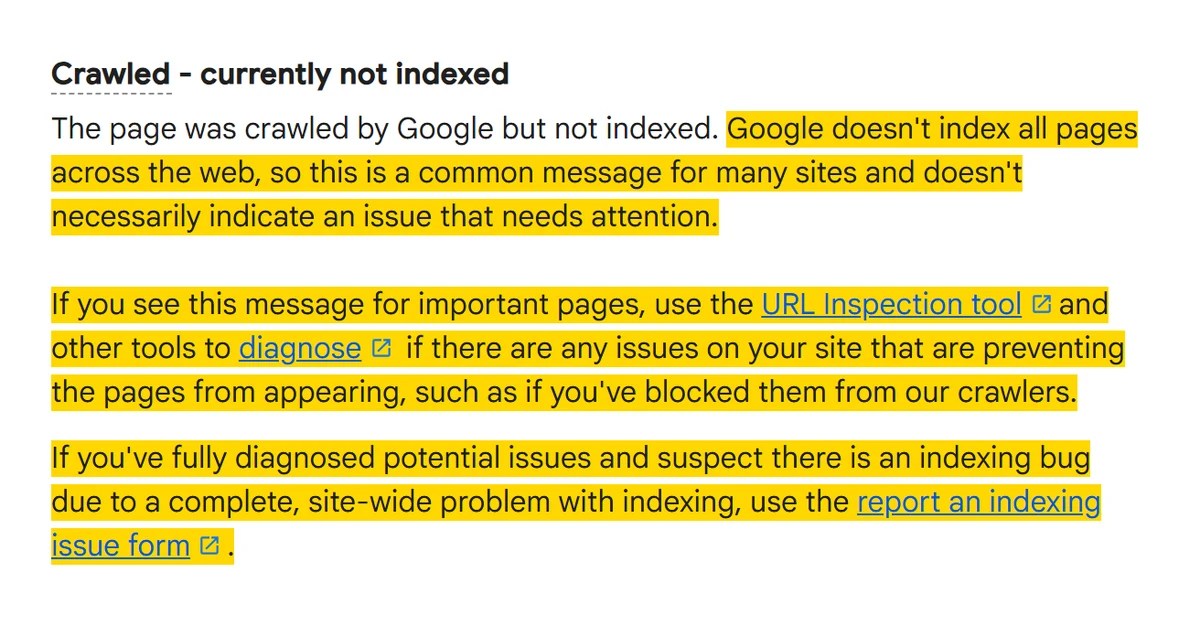
Google has rewritten the “Crawled - currently not indexed” entry in the help page for Search Console’s Page Indexing report, the page that explains each reason a URL is not in Google’s index. Search Engine Roundtable reported the change on 3 November 2026. The entry now opens:
The page was crawled by Google but not indexed. Google doesn’t index all pages across the web, so this is a common message for many sites and doesn’t necessarily indicate an issue that needs attention.
For important pages, it says to use the URL Inspection tool and other tools to diagnose whether something on the site is stopping them appearing, “such as if you’ve blocked them from our crawlers”. The report an indexing issue form is for after that diagnosis, where you suspect “a complete, site-wide problem with indexing”. A Wayback Machine snapshot of the help page from 26 October 2026 shows the previous entry said only that the page “may or may not be indexed in the future; no need to resubmit this URL for crawling”.

What should you do about pages that are crawled but not indexed?
Start by filtering the list down to pages you need in search. For those, run URL Inspection to rule out a technical block before anything else. The help entry names no cause beyond blocking, but Google has said more elsewhere: on the Search Off the Record podcast in July 2026, asked whether the status is a sign of a quality issue, John Mueller of Google’s Search Relations team answered “Sometimes”. He said the pattern to act on is “Google is not indexing a lot of your pages and there’s no technical reason”, and the response then is to “take a step back and think about the quality overall”, not to try to fix each page technically. The form is not a route for getting individual pages indexed.
The Why isn’t my page indexed? guide works through each reason code and its first check.
Sources
More news
-
Search Console Shows Unexplained Click Spikes for Some Sites
Some Search Console properties show a sudden jump in clicks with flat impressions. Google has not explained it. How to check whether your spike is real.
-
DebugBear Tells Customers to Remove Its Core Web Vitals Script After a DNS Hijack
DebugBear says attackers took over its DNS and told customers to remove its real user monitoring script. Here is what to remove and what to check.
-
Lighthouse 13.6 Stops Penalising Some Preloads in Simulated FCP and LCP
Lighthouse 13.6.0 stops counting module preloads and some fonts against simulated FCP and LCP. What changes in PageSpeed Insights, and what to re-test.