Chrome 158's XSLT Warning Does Not Mean Your Sitemap Is Broken
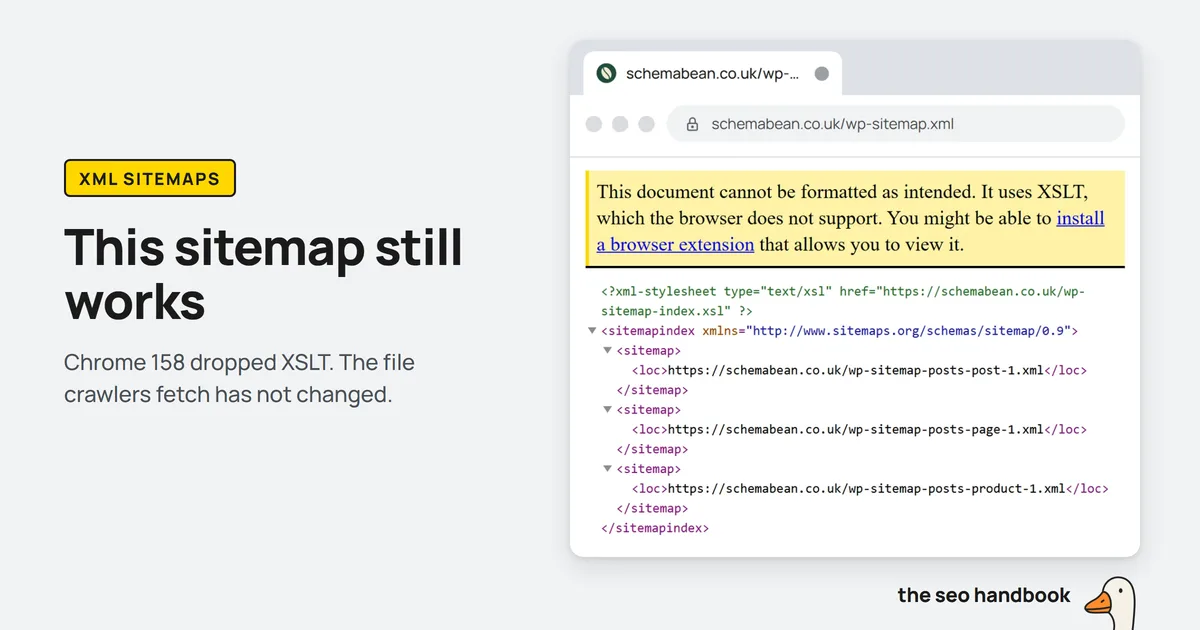
Chrome 158, which began rolling out to stable users on 17 November 2026, no longer supports XSLT, a stylesheet language that turns an XML file into a readable page inside the browser. Many WordPress sitemaps use it to appear as a table of links. Opened in Chrome 158, they now show raw XML under this message:
This document cannot be formatted as intended. It uses XSLT, which the browser does not support. You might be able to install a browser extension that allows you to view it.
Does the XSLT warning affect how Google reads a sitemap?
No. The warning is about display in the browser. The removal happened in Chrome, and the server still sends the same file, with the same URLs in it, as it did before the update. Google’s instructions for building a sitemap do not mention a stylesheet.
To check your own file, open the Sitemaps report in Search Console. A status of Success means Google fetched the sitemap and read it without errors. The report lists only sitemaps submitted there or through the API, so submit yours if it is missing.
A fault in the XML looks different. When we opened a sitemap containing an unescaped ampersand in Chrome 158, it said “This page contains the following errors” and gave a line and column number, with no mention of XSLT. That fault does need fixing, because the file itself is invalid.
Which WordPress sitemaps show the warning?
We read the code of the WordPress.org versions available on 23 November:
| Sitemap from | How it is styled | In Chrome 158 |
|---|---|---|
| WordPress core, up to 7.1 | XSLT | Warning |
| Rank Math 1.0.282 | XSLT | Warning |
| All in One SEO 5.0.5.1 | XSLT | Warning |
| SEOPress 10.4 | XSLT | Warning |
| Yoast SEO 28.9 | CSS | Styled |
| The SEO Framework 5.2.1 | CSS, with XSLT for browsers that support it | Styled |
WordPress 7.2, due on 8 December, removes the stylesheet from core sitemaps. They will still open as raw XML, without the XSLT warning.
What to do about the warning
- Leave the sitemap as it is. Deleting it or switching SEO plugin fixes nothing for Google, and a switch can change the sitemap’s URL.
- Tell clients and colleagues before they find it. The November 2026 core update was still rolling out on 23 November, and a warning on the sitemap is easy to mistake for the cause of a ranking drop.
- Update the plugin if people need to read the sitemap in a browser. Yoast SEO 28.9 and The SEO Framework 5.2.1 have already moved to CSS.
- Check other XML that people read. A styled RSS feed, or a page built with XSLT, loses its formatting in the same way. Chrome’s documentation covers the replacements. Chrome says Firefox and WebKit, the engine behind Safari, have also indicated plans to remove XSLT.
Sources
- Removing XSLT for a more secure browser, Chrome for Developers
- Stable Channel Update for Desktop (17 November 2026), Chrome Releases
- Build and submit a sitemap, Google Search Central
- Sitemaps report, Search Console Help
- class-wp-sitemaps-renderer.php, WordPress development repository (23 November 2026)
- Your WordPress Sitemap Isn’t Broken: Chrome 158 Has Dropped XSLT, Search Engine Journal
More news
-
Google Publishes a Guide to Letting Google-Agent Past Bot Defences
Google's new crawling guide explains how to verify Google-Agent and let it through CDN, firewall and bot-detection rules, including CAPTCHAs and API endpoints.
-
Google Documents the Referer Values Its Search Traffic Sends
A new Google Search Central page lists the Referer values Google Search sends and why analytics will not match Search Console.
-
Google: Moving to a CDN Can Raise Crawling Before the Cache Is Ready
Google says a CDN switch can raise Googlebot's crawl rate while the cache is still empty, loading the origin. The fix: pre-warm, allow verified bots, use 429.