Google Business Profiles Add a Collected Info Tab
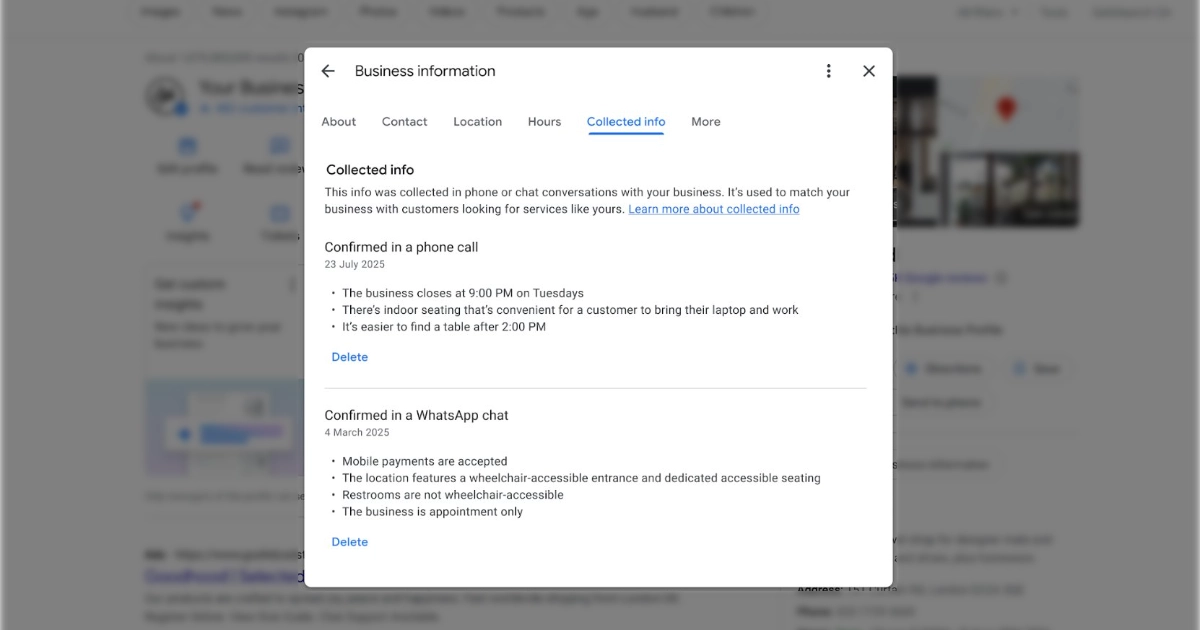
Google has announced that Collected info, a tab it had been testing for a few months, is now officially live in the Business Profile dashboard. Google’s automated assistant sometimes contacts a business by call, text or WhatsApp on its verified phone number to confirm details, then uses the answers to update the profile, and the new tab is where an owner can see and manage what was gathered.
Under Edit profile, the Collected info tab lists each detail with its source and the date it was collected, and lets you delete anything that is wrong. Deleting a detail removes it from Google’s records but does not change other fields already on the profile. Google notes the feature is currently available for select regions, languages and business categories, so it may not appear on every profile yet.
The takeaway: if the tab is present on your profile, open it and check for details Google’s automated systems added incorrectly, because those can feed into how your business is matched to searches, and delete any that are inaccurate.
Sources
More news
-
Google Search Console Drops June Indexing Data With No Backfill
Google Search Console's page indexing report is missing several days of June 2026 data, and Google says it will not be backfilled.
-
Google Cuts the Search Profile Threshold to 10,000 and Adds Multi-Account Support
Google has lowered the Search profile follower threshold to 10,000 and now lets one account manage up to 10 separate profiles, aimed at publishers running several brands.
-
Google Tests Paying Publishers Through an AI Contribution Pilot
Google is running an invite-only Search Console pilot that pays some publishers when their content shapes an AI Overview, AI Mode or Gemini answer.
