Google Shows How Long Crawling, Indexing and Search Result Changes Take
On 2 October 2026, the last day of Search Central Live Deep Dive Europe in Barcelona, Gary Illyes, an analyst on the Google Search team, showed four slides headed “How long does it take to…”. They give a typical time and a slowest time for 23 processes across crawling, indexing and serving, and each carries the footnote “Times expressed on the diagram are estimations based on internal analysis.” Google has not published the slides. They are known from attendees’ photos, including those posted by Estela Franco, senior technical architect in web performance at Shopify, and from a written recap by John Campbell, head of innovation and AI at ROAST. Both were among the event’s community speakers.
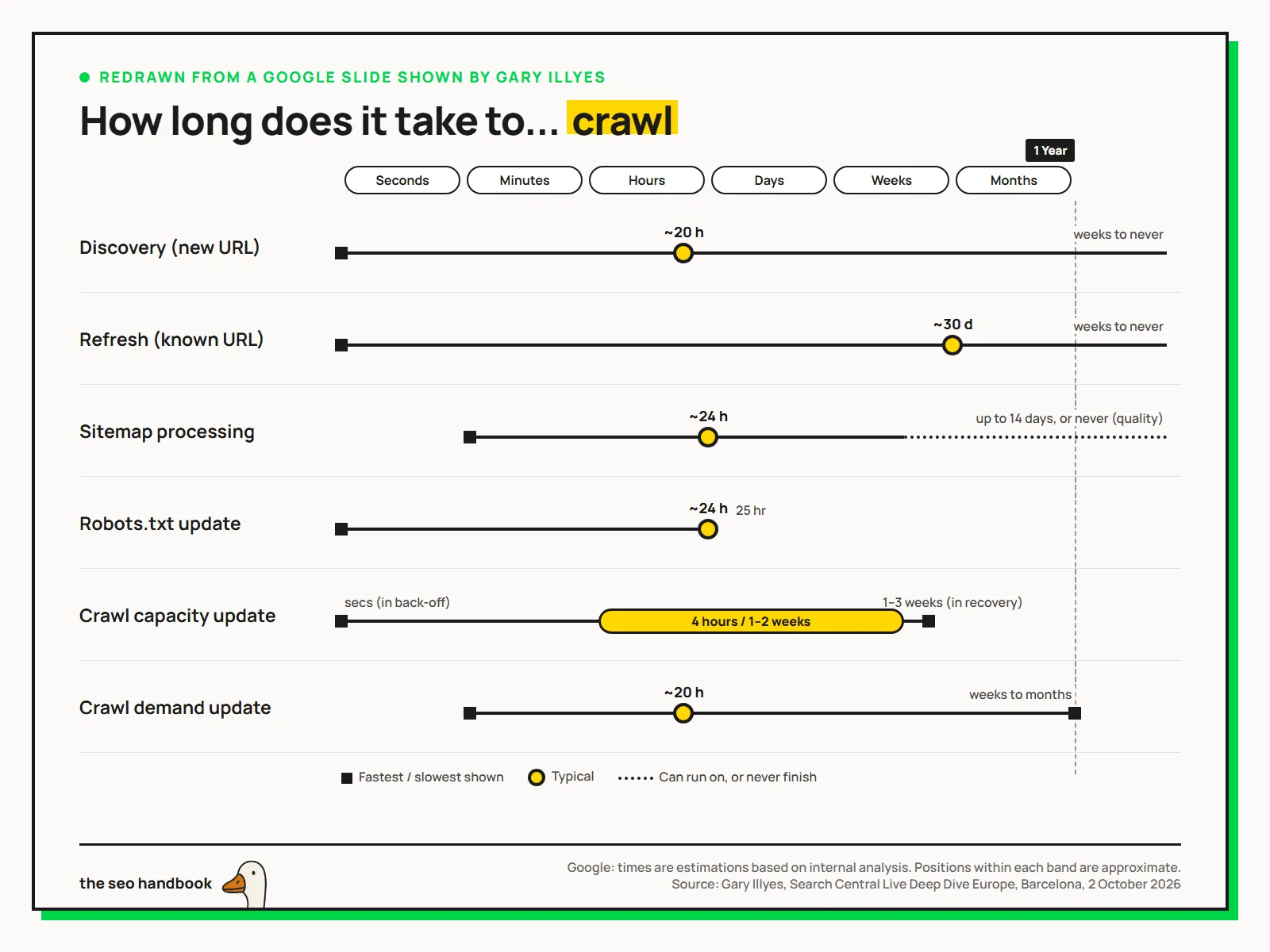
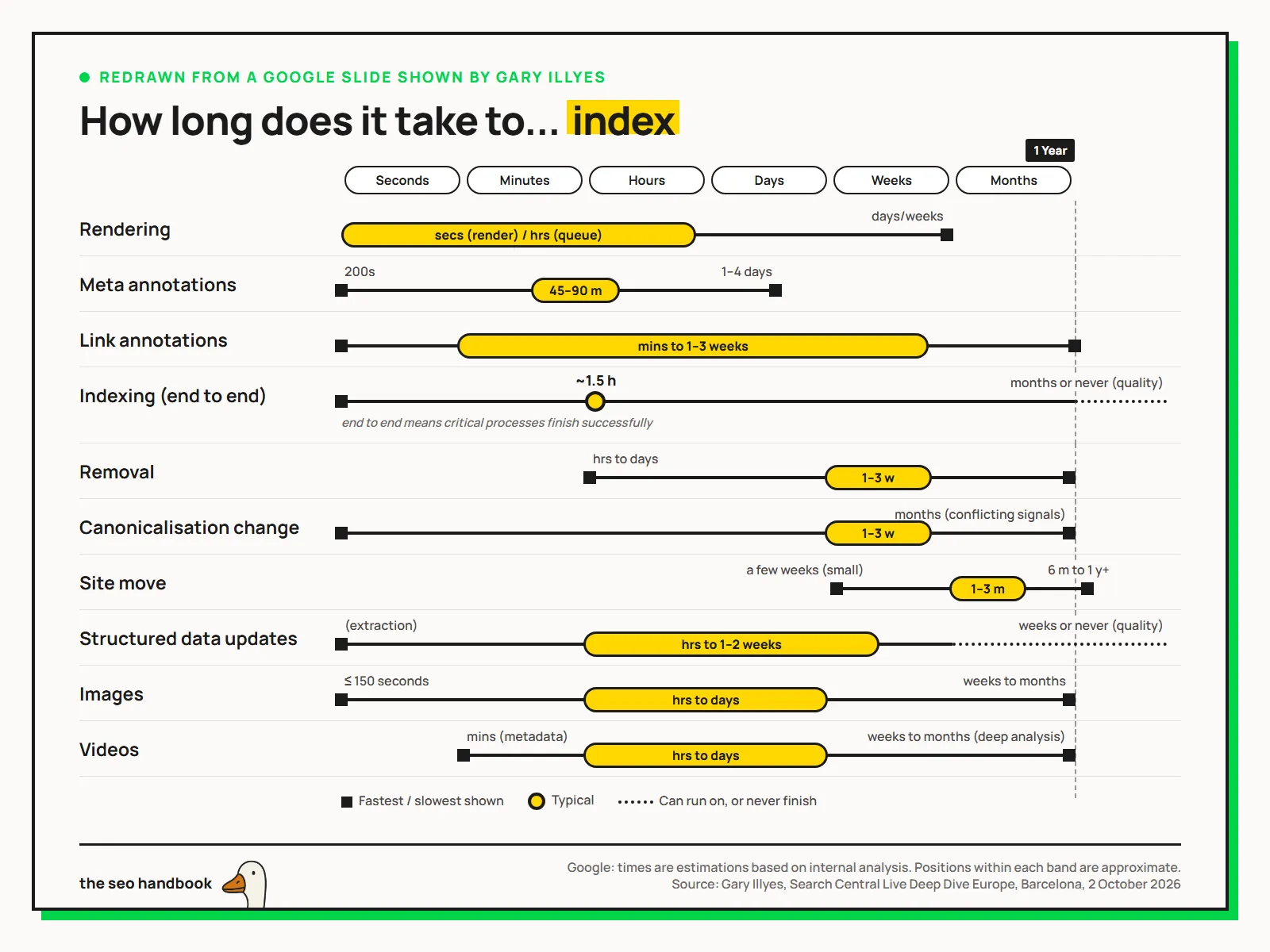
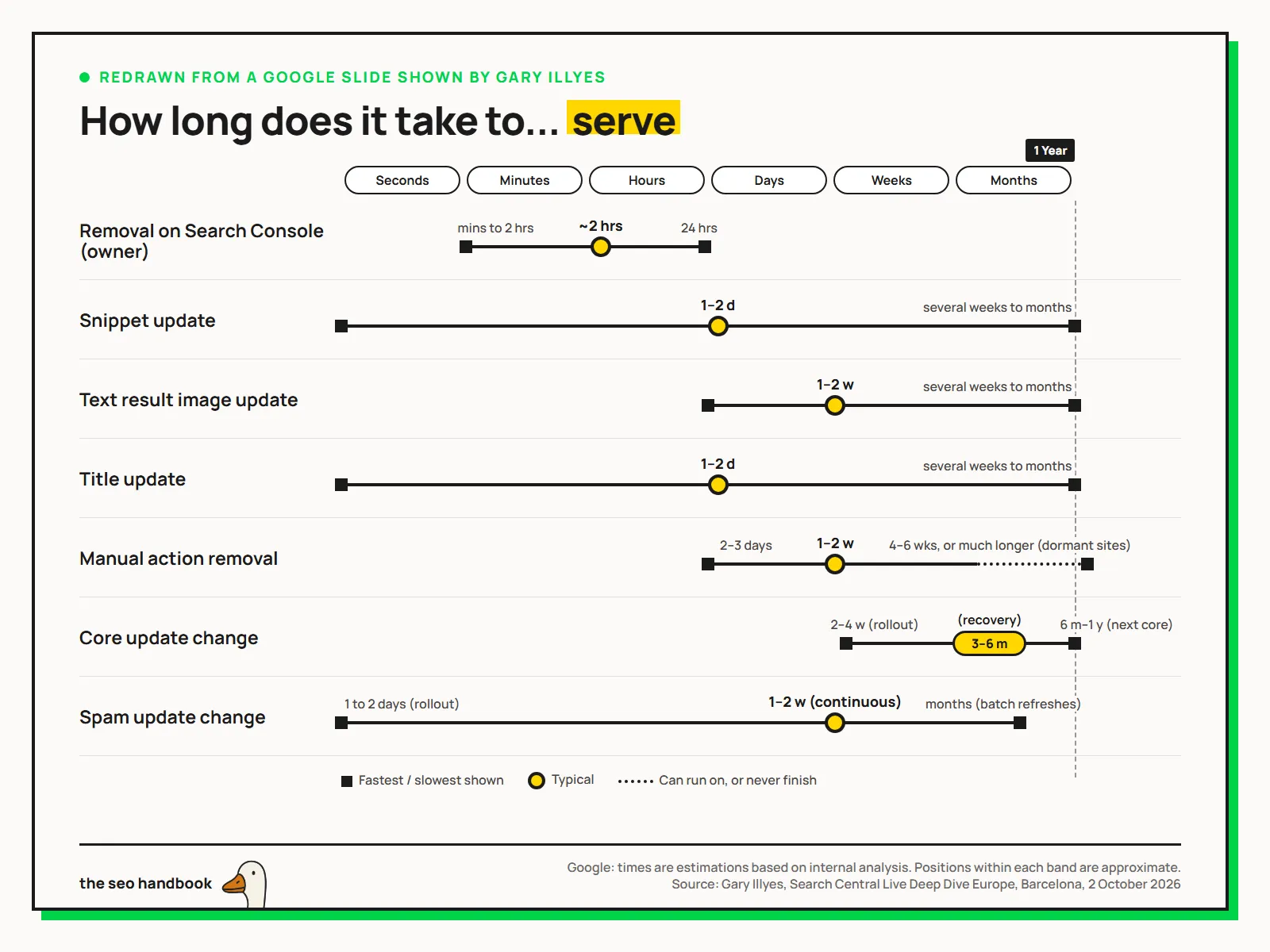
The tables below carry the same figures as text. “Typical” is the dot or bar the slide legend marks as typical; “slowest” is the corner case at the right-hand end of each line.
How long does Google take to crawl a page?
| Process | Typical | Slowest |
|---|---|---|
| Discovery (new URL) | ~20 hours | Weeks to never |
| Refresh (known URL) | ~30 days | Weeks to never |
| Sitemap processing | ~24 hours | Up to 14 days, or never (quality) |
| Robots.txt update | ~24 hours | 25 hours |
| Crawl capacity update | 4 hours to 1–2 weeks | 1–3 weeks (in recovery) |
| Crawl demand update | ~20 hours | Weeks to months |
The fastest end of the crawl capacity line reads “secs (in back-off)”: Google can cut how hard it crawls a site within seconds when the server struggles, and takes one to three weeks to restore it.
How long does Google take to index a page?
| Process | Typical | Slowest |
|---|---|---|
| Rendering | Seconds to render, hours in the queue | Days to weeks |
| Meta annotations | 45–90 minutes | 1–4 days |
| Link annotations | Minutes to 1–3 weeks | Months |
| Indexing (end to end) | ~1.5 hours | Months, or never (quality) |
| Removal | 1–3 weeks | Months |
| Canonicalisation change | 1–3 weeks | Months (conflicting signals) |
| Site move | 1–3 months | 6 months to 1 year+ |
| Structured data updates | Hours to 1–2 weeks | Weeks, or never (quality) |
| Images | Hours to days | Weeks to months |
| Videos | Hours to days | Weeks to months (deep analysis) |
The slide defines end to end as the point when “critical processes finish successfully”. Indexing follows crawling on the slides, so the 1.5 hours adds to the crawl times above rather than replacing them. The site move line starts at “a few weeks (small)”, so a small site can finish well inside the typical range.
How long do changes take to show in search results?
| Process | Typical | Slowest |
|---|---|---|
| Removal on Search Console (owner) | ~2 hours | 24 hours |
| Snippet update | 1–2 days | Several weeks to months |
| Title update | 1–2 days | Several weeks to months |
| Text result image update | 1–2 weeks | Several weeks to months |
| Manual action removal | 1–2 weeks | 4–6 weeks, or much longer for dormant sites |
| Core update change | 3–6 months to recover | 6 months to 1 year (next core update) |
| Spam update change | 1–2 weeks (continuous) | Months (batch refreshes) |
The core update and spam update lines also mark their rollouts, two to four weeks for a core update and one to two days for a spam update, as the fastest point on each line. The typical figures are separate from the rollout: the core update one is labelled recovery.
How do the figures compare with Google’s documentation?
For most of these processes, Google’s documentation gives no figure at all: nothing on discovery, refresh, sitemap processing, rendering, annotations, end-to-end indexing, or title and snippet updates. Where it does give one, the slides narrow it:
- Crawling. The recrawl documentation says crawling “can take anywhere from a few days to a few weeks”. The slides separate a new URL (about 20 hours) from a known one (about 30 days).
- Robots.txt. The documentation says Google “generally caches the contents of robots.txt file for up to 24 hours”. The slide agrees, with 25 hours as the slowest case.
- Site moves. The documentation says a small to medium-sized site “can take a few weeks for most pages to move”. The slide’s typical range of one to three months is longer, and its line starts at a few weeks for a small site.
- Canonical changes. The canonicalisation troubleshooting page says Google may hold pages in a duplicate cluster “for up to two weeks” after a fix. The slide gives one to three weeks typical, and months where signals conflict.
- Core updates. The documentation says some changes take effect “in a few days” but confirming a site-wide improvement “could take several months”, and that waiting for the next core update may be necessary. The slide puts the typical figure at three to six months and the slowest at the next core update.
What do the timing slides leave out?
Neither the slides nor the recap give a sample size, a measurement period, or how “typical” was calculated, whether a median, a mean or a judgement. Estela Franco’s post describes the figures as averages; the slides themselves say typical. Nothing says whether they vary with site size or location, which a commenter on Franco’s post also asked. Treat them as Google’s description of normal behaviour, not as a service level.
The word “never” appears five times in the slowest column. Three of those, for sitemap processing, end-to-end indexing and structured data, add “(quality)”: a URL Google judges not worth indexing may never complete the process, however fast the technical work was done. Campbell’s recap also records Illyes cautioning that the processes are linked, since a page cannot be indexed until it has been crawled, so delays at one stage carry into the next.
What the timings mean for judging SEO changes
Before deciding a change has failed, check that the stage it depends on has had its typical time to run. An edit to an existing page waits on a recrawl that typically comes around 30 days after the last one, so checking rankings a week later can measure nothing. The URL Inspection tool in Search Console shows when Google last crawled a URL, and its request indexing option is Google’s documented way to ask for a recrawl of an individual page. For larger work, the slides give a defensible timeline to set with a client or manager: one to three months for a site move to settle, three to six months for recovery after a core update. Something still unresolved past the slowest column is more likely stuck than slow, and worth investigating.
Sources
- Google Search Central Live Deep Dive, Barcelona: Day 3 recap, John Campbell, ROAST
- How long does it take for Google to crawl, index, and serve a webpage?, Estela Franco, LinkedIn (slide photos)
- Google Shows How Long Crawling, Indexing & Recovery Can Take, Search Engine Journal
- Search Central Live Deep Dive Europe 2026, Google Search Central Blog
- Search Central Live Deep Dive Europe 2026: Meet the community speakers, Google Search Central Blog
- Ask Google to recrawl your URLs, Google Search Central
- How Google interprets the robots.txt specification, Google Search Central
- Site moves with URL changes, Google Search Central
- Troubleshoot canonicalization issues, Google Search Central
- Google Search’s core updates and your website, Google Search Central
More news
-
Search Console Now Combines Traffic From Several Countries
Search Console's Performance report now lets you select several countries in one filter and see their Google Search traffic as a single combined total.
-
Google Defines Main Content and Calls Fabricated Author Profiles Deception
Google's people-first content guidance now defines main content, lists the four attributes raters judge it on, and calls fabricated author profiles deception.
-
Google Says It Is Critical to Fact-Check AI Content Before Publishing
Google's generative AI content guidance now calls a manual fact-check of all AI output critical, extending the review to titles, alt text and structured data.
