Google Trends Adds Category Filters to the Explore Page
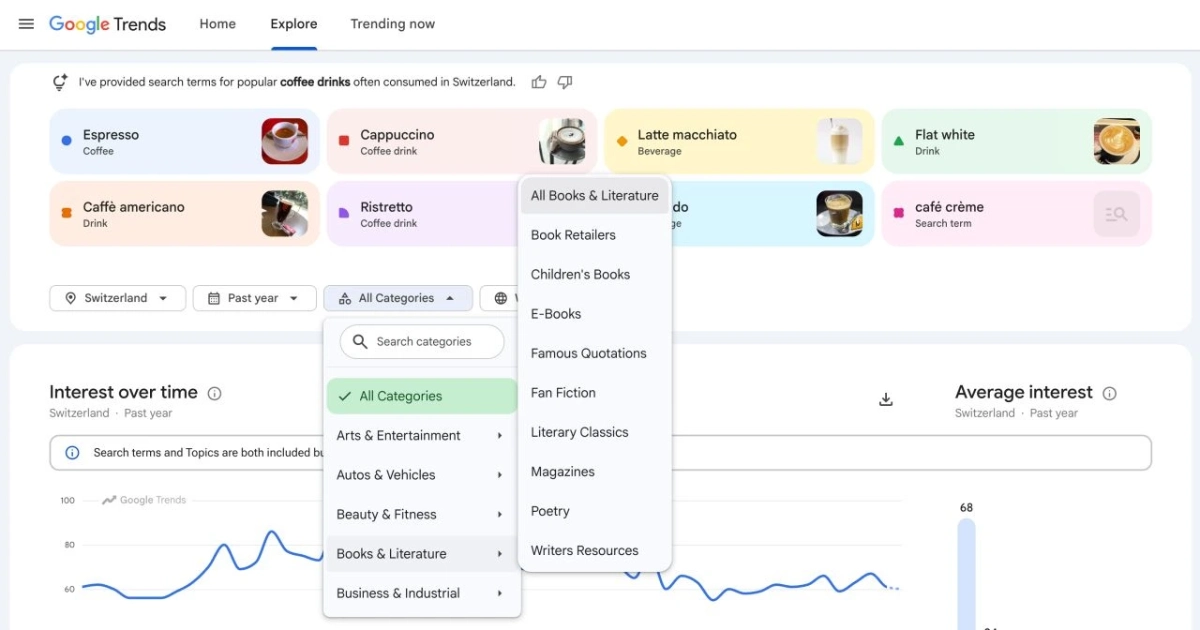
Google Trends has added a category filter to its new Explore page, announced by the Trends team on 2 September 2026. The filter works two ways: apply it alongside a query to narrow that query’s trend data to a single category, or apply it with no query at all to see the top-searched terms within a category across a chosen region and timeframe.
The second mode is the useful one for keyword research. Filtering a category on its own turns Explore into a discovery surface: instead of testing terms you already have, you can read the terms rising within a niche and work outward from there. Google’s own example is narrowing “Java” to a search-marketing category to separate the programming sense from the rest. Open the Explore page, set the category (and, if you want, leave the query blank), and read what the category is surfacing before you commit to a seed term.
Sources
More news
-
Google Tag Manager Can Now Send Google Data Without Loading gtag.js
Since 12 October 2026, Tag Manager can send data to Google Analytics and Ads without loading gtag.js. The switch is opt-in; check three things first.
-
Bing Webmaster Tools Now Lists AI Search Queries Where Other Sites Are Cited and Yours Is Not
Topic Portfolio, a beta in Bing's AI Performance report, sizes topics across all sites and lists grounding queries where competitors are cited and you are not.
-
Rank Trackers Are Being Served Altered Google Results
Ahrefs, Semrush, Nozzle and other rank trackers report Google serving them normal-looking results pages with the wrong results since September 2026.
